Up and Down to move, Enter to open. Searches every page, tip, table and command.
GuideLeading a guildFor officers
Rank access, the officer tools, and the helper leaderboards that thank the guild's most generous members.
Setting up a new guild?The guild setup page covers all of this step by step and gives you one code to paste with /wc setup. In game, Guild > Setup has the same checklist, and Copy this guild's setup gives you your current setup as a code.
Guild > Access shows who may use Warchest, who has officer tools and who sees chat history. Its Access & ranks button (or /wc access) lists your guild's real rank names, custom ones included, with Can use and Officer tools checkboxes. Saving writes one line into the Guild Info text. Every member's add-on reads that same line, so every client enforces the same rule:
Try it: tick ranks on the right and watch the line the add-on would write.
Warchest: officers=0,1 alts=1Rank 0 (Guild Master) is always included and always an officer. Private mode whispers guild data only to included members instead of using the guild channel.
| Officer tool | Where | What it does |
|---|---|---|
| Guild needs | Requests > Guild needs > New need | Item, amount, due date, note, who to deliver to. Members see a progress bar of what the collector has received since the need was posted (or what the guild vault gained), and Help fills in a mail to the collector with what they carry attached, up to what's still missing. Announce posts it in guild chat. |
| Stock alerts | Needs tab > Stock alert | Get alerted when guild bank characters hold less than a minimum. |
| Scheduling a raid | Raid tab > Schedule raid | Raid, day and time; optionally the minimum level and items per raider. Follows the guild calendar on its own. |
| Loot notes | Gear tab > item > Loot note | "Reserved for tanks" on everyone's tooltip for that item. |
| Raid tools | Raid tab | Lock and size soft reserves, run loot points (award, spend, automatic awards), check buffs at ready checks: see Reserves, points and readiness. |
| Events and polls | Together tab | Schedule events and contests, ask the guild in a poll, post them and their results: see Together. |
| Chat history | Together > Chat, or Guild > Access | Catch-ups are on by default (guild chat for every rank that may use Warchest, officer chat for officer ranks); change the ranks per channel, turn one off, or go back to the default: see Chat history. |
| Guild vault tools | Vault tab | Tab rules and tidying, drives, loans, work orders, raid kits, the repair budget, reports and withdrawal alerts: see Running the vault. |
| Guild bank characters | Guild tab > Bank char | Labels them for everyone and turns on their deposit and withdrawal history (History tab). |
| Bank approvals | Access & ranks (optional) | Requests to bank characters wait in the Requests tab until an officer approves or declines. |
| Guild health | Guild > Health | Add-on adoption, members inactive 14+ days, who can craft each raid item, profession gaps, cooldowns. |
| Purge and links | Guild tab, /wc link | Remove a leaver's data guild-wide; fix an alt link. |
| Export CSV | Guild tab > Export CSV | Guild totals, holdings, my items, sign-ups, loot, inactive members, attendance and helpers, ready for a spreadsheet. |
Board entries carry their own version, so two officers editing different things never clash. Members only accept board data sent by an officer.
On the guild portal, the guild's Recruiting tab puts your guild in the guild finder: the classes and roles you need, raid times (players see them in their own time zone), your focus, loot system and a short pitch. Under it, the finder shows numbers from your own uploads (bosses killed, raid nights this month, active members), so keep uploading.
Players apply in a few clicks, or post that they're looking so your recruiters can reach out. You talk on the portal: accept, decline with a note, or reply, and the portal gives you the /ginvite to use in game. The guild master chooses which ranks may recruit (Settings > What each role may do).
In the portal's Settings, paste a Discord webhook (Server Settings > Integrations > Webhooks) and pick what to post. After every upload:
Recaps can leave out everyone's numbers. Mentions are always off, and the same raid night is posted once however many officers upload.
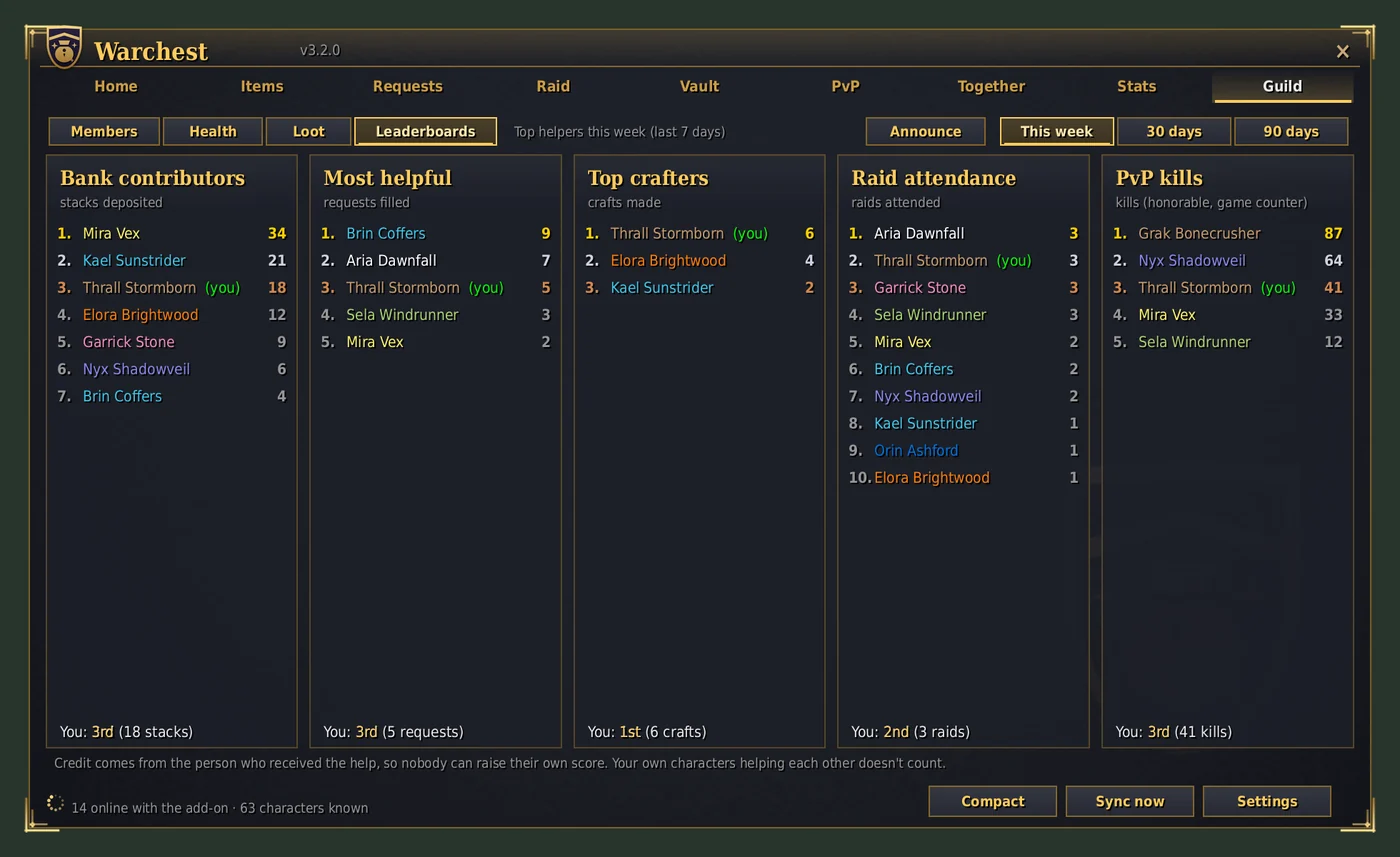
Credit always comes from the person who received the help, never from the helper:
Your own characters helping each other doesn't count, and one person's credit to another is capped per day.
Once your Getting started card is complete, its place on Home goes to Guild heroes: this week's top helper on each board, and your own best placement.
Officers' Announce posts one line in guild chat:
These five helper boards also appear in the Stats tab's Guild spirit page, next to 39 more: see Stats.
Settings > Notifications & look: untick Show me on the guild leaderboards. It applies to all your characters.
